
When I was growing up, our primary form of taking family vacations was going trailer camping with my parents, grandparents, and family friends. It’s a tradition that started when my dad was a kid back in the 1960s and still continues today. I never went down the path of owning a trailer camper or RV; storing one in Brooklyn would be challenging to say the least. But my dad still has one and we go with him once or twice a year to some of our favorite spots.
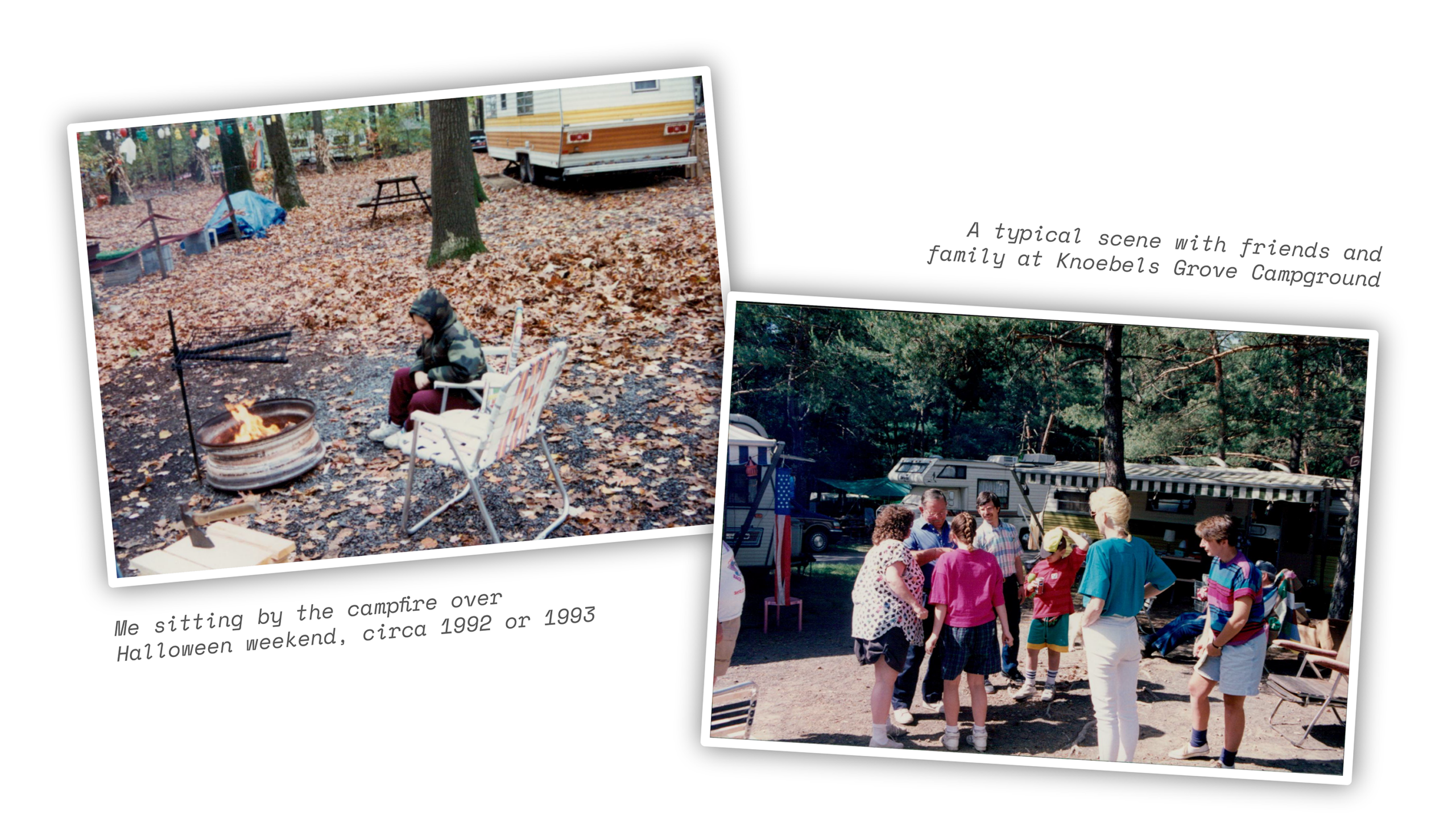
At the start of my family’s camping adventures in 1969, my grandmother wrote handwritten journals about their escapades all throughout the US East Coast and beyond. She kept writing these camping logs for over 40 years, capturing hundreds of trips, memories, and anecdotes. Every now and again, my dad and I talked about how great it would be if we could get them digitized, mainly to preserve them. No one ever had the time or stamina to manually transcribe the thousands of pages.
I always had the thought in the back of my mind that one day, eventually, we’d be able to digitally transcribe the journals with high enough precision that we could make it happen. And finally, with the advent of multi-modal AI models with visual reasoning capabilities, we were able to turn that idea into reality.
The Spark
I used to work at Google and still regularly use many of its products, including the Gemini app and direct model access via AI Studio. Google catches a lot of flak in the AI tech discourse for its Gemini models, especially around coding capabilities. Maybe there’s some truth to that, but I find that Google excels at multi-modality: being able to effectively process inputs and outputs across text, images, and videos.
My 91-year-young grandmother recently moved from the home she’d been in for more than 50 years to an assisted living facility. It’s a tough process for any family to go through, but it also offered up a moment to reminisce on family history, as well as to answer the question: “what do we do with all this stuff?” Is it worth any money? Should we keep it, sell it, or throw it out? Gemini is great for this: snap a photo, ask what the thing is, and how much it’s worth.
During the process, we happened upon the camping journals. I thought “hm, I wonder how well it can read Nana’s handwriting…” I snapped a pic and asked Gemini to transcribe the words on the page I opened up. Within less than a minute, I had the page fully transcribed. No glaring errors in the digitized version (more on that later). Wow, we can finally do this!
It became immediately evident to me that while the tech was there, taking individual photos of each page and transcribing them in the Gemini mobile app was not scalable. And, using the app was not consistently tapping into the full power of Google’s models. This task required a deliberate, scripted workflow to turn these physical journals into structured digital files so I could do… something with them.
The Workflow
One of the most impactful things I’ve learned about using AI is that if you don’t know how to do something with AI, just ask the AI how to do it. That set off my journey: providing the context of what I wanted to accomplish (digitizing the journals in structured data files) and iterating with AI on creating the workflow to do it. The path to get there involved some trial and error (and many python scripts).
In the end, my workflow looked something like this:
- With his iPhone and a special rig purpose-built for the task, my dad meticulously and sequentially took photos of each individual page from each journal, put them into folders, and shared each journal folder with me.
- A python script generated by AI sent each photo to Google’s Gemini 3 Flash model with visual reasoning set to Low. A prompt directed the model to analyze each image in sequence and write the transcribed text from each page into a structured JSON file, with rolling context to ensure continuity across pages. The script specifically parsed out things like the writing on the margins of the pages, which my Nana was known for writing in. It also parsed out the people mentioned on the page, the visited locations, the page number, journal number, dates, and more. I had to do a few iterations to get the data structure and mapping locked in.
- Run each journal through the transcription script. It took a couple weeks for my dad to do all the scans, so this was a piecemeal process. Each journal varied in the number of pages, from less than 100 to more than 300, so completion time varied. Still, I don’t think any one journal took more than an hour to process.
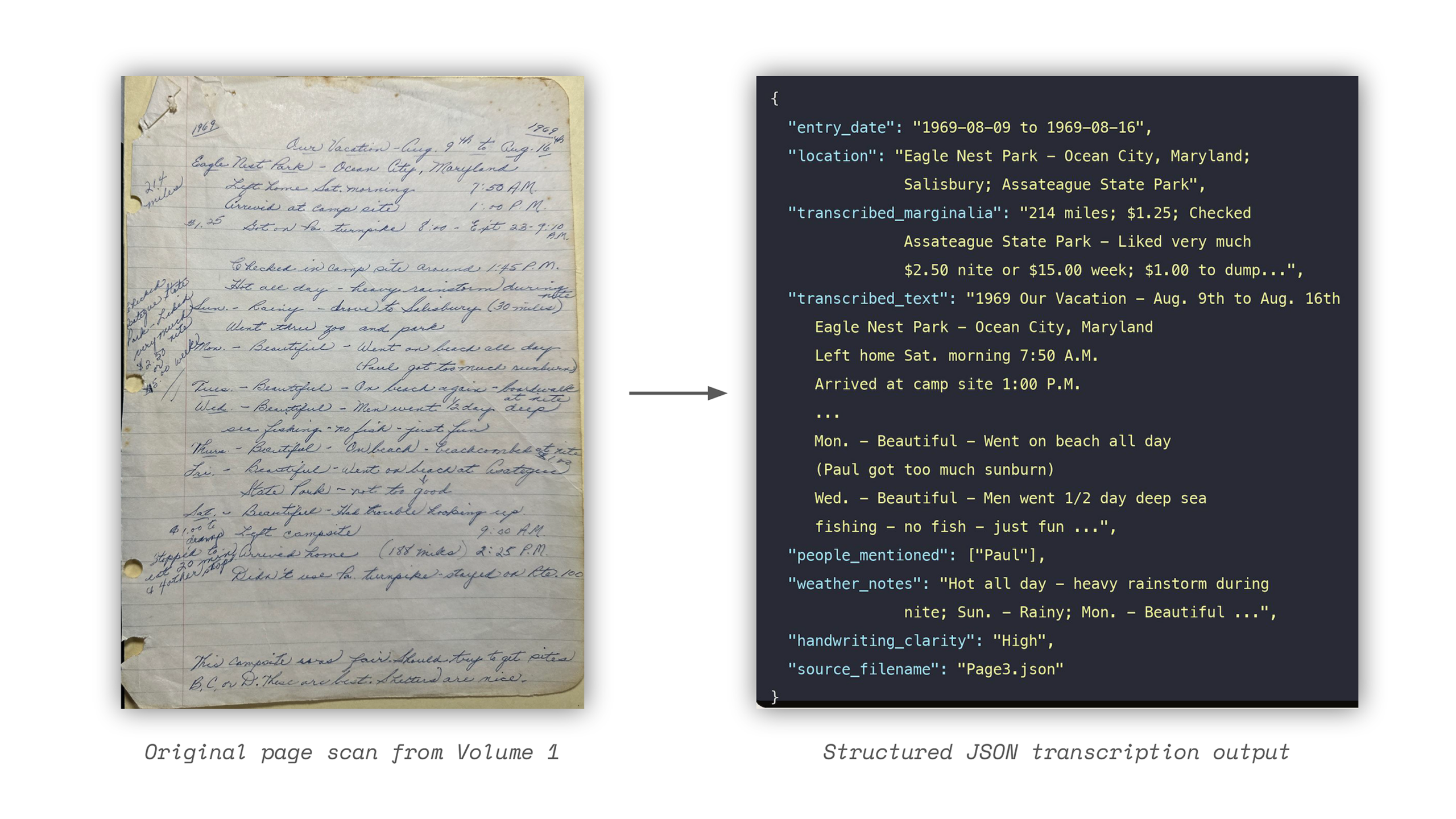
That’s it! Well… not quite. While the transcription accuracy was very good in general, there were plenty of errors to fix. Many of these were related to the idiosyncrasies of my grandmother’s penmanship style, particularly with names. Capital Ls were often confused for Capital Hs. Lowercase Os were confused for Lowercase As. I once again turned to AI to help me fix these issues.
Gemini recommended an offline fuzzy matching Python script that ran through all the journal page entries to identify potential mismatches specifically for names, and also generated an LLM proofreader to check for other spelling errors. Going through this process was the most tedious part because I had to manually review and apply the edits across the journals using Find and Replace in VS Code. I didn’t want AI to make these decisions for me, in part because I needed to manually look at the scanned pages for verification of certain names and spellings, and also ask my Dad for some guidance on interpretations.
Even after that, there were still some persistent misspelling or misinterpretation errors I was noticing with names. Given that the fuzzy matcher created a name list as part of its functions, I had Gemini generate a script to identify rare or unique names that weren’t otherwise mentioned across the set of journal transcriptions to pinpoint these final errors. Once I ran through that and made additional corrections, most of the major issues were fixed.
The Fun Part
Now that I had all the journals in structured, lightweight JSON files, it was time to actually do something with them. At first, I loaded all the files into NotebookLM, which quickly analyzed them and gave me a plethora of options to explore: surfacing unique insights from across the journal collection; creating quizzes and infographics about those insights; generating podcasts about specific places we visited often.
These are interesting novelties to play around with but I didn’t spend a lot of time on them. I knew that I wanted to create an interactive website where family members and friends could read and explore the journals. That’s when I decided to switch from Gemini to Claude Code.
None of these tools are perfect, but I found that Gemini often made simple errors on the scripts it was generating for me, resulting in a lot of back and forth to get to something usable. Also, Opus 4.7 was launched around the time I started working on this next phase, unlocking true agentic coding workflows. This project was perfect for really putting Claude Code to the test, and so that’s what I did.
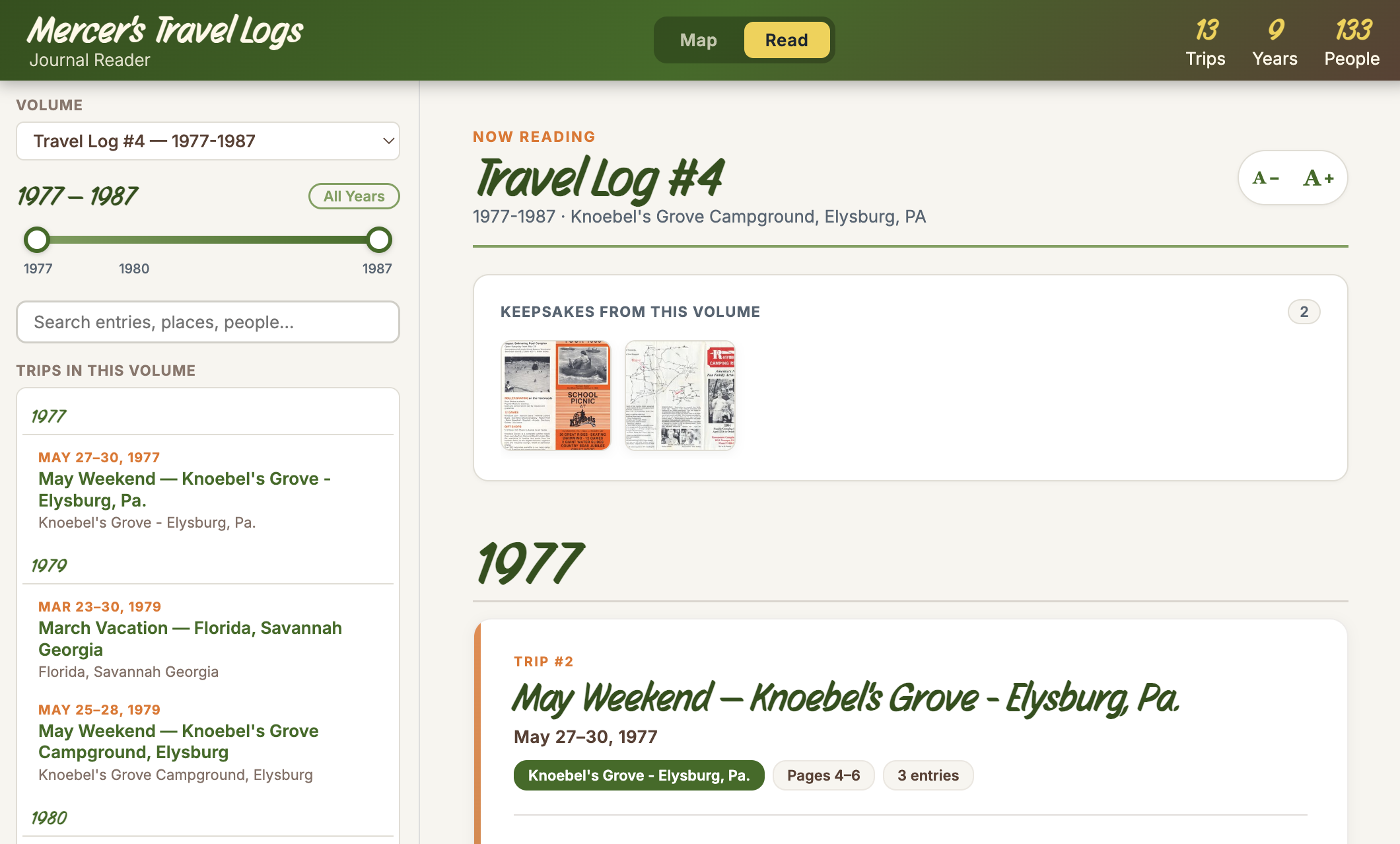
In working with Claude Code, I was able to generate an interactive site with 2 modes: Read and Map. Read mode lets you peruse all the individual volumes but also filter by year or person.
Map mode uses the location data embedded in the JSON files to give a rich visual view of camping hot-spots, as well as the one-offs.
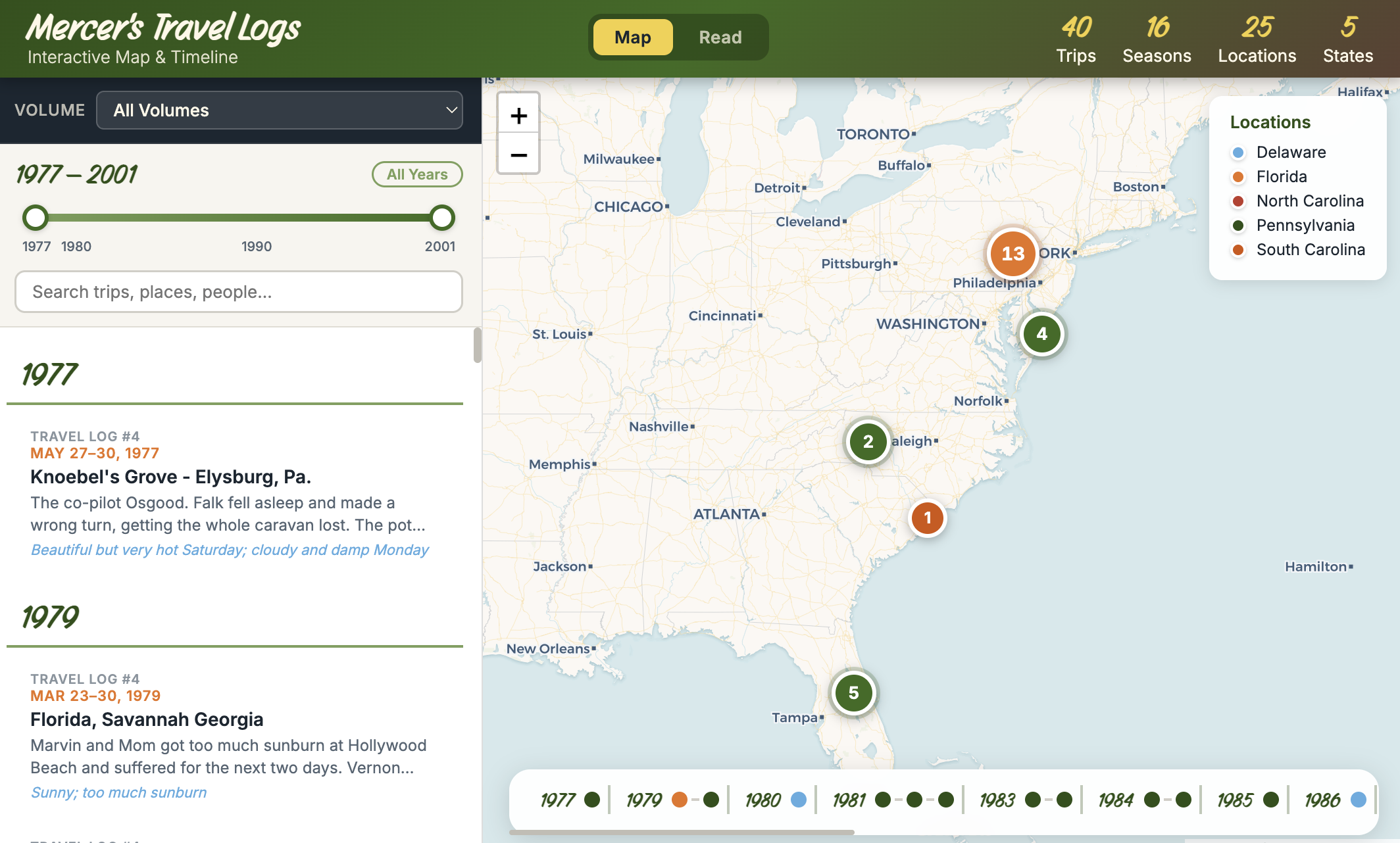
Again, the tools aren’t perfect. I’ve done a ton of iteration and have blown through my Claude Pro plan limits many a time to build and refine the site to my taste. According to an audit I did with Claude, I used more than 3,400 prompts and generated 6,200 lines of front-end code to navigate 295 trips made across 40+ years (the screengrabs are from the demo site).
I would have never otherwise had the time, patience, skill, or motivation to do this by hand until the advent of AI coding. It’s incredibly empowering, especially if you have a good deal of technical know-how and systems thinking but aren’t a full-blown software engineer. There is no longer such a thing as an “ideas person” in tech when these tools so easily let you bring your ideas to life.
I’ve continued to enrich the site using AI. The earlier journals had ephemera from the campgrounds and tourist attractions the family visited: brochures, maps, notes, receipts, and more. We also have photos from many of these trips. I’m editing these artifacts in Adobe Lightroom Classic and using AI to enrich the metadata of the imagery, making it easier to match the scans with the relevant journal entries. The most time-consuming part is the photo editing itself, which I’ve tried to automate but I still think requires my human eye and judgment to do properly.
Everything is coming together quite nicely. Because the journals contain a lot of personal, private details from our family over the years, and because it literally contains PII, I’ve also used AI to create a sanitized demo you can check out here: https://camping-journals-demo.bryanyeager.workers.dev/
Lessons Learned
This little pet project of mine taught me a lot about using AI to build and automate things, as well as mistakes to avoid in the future. Here are a few takeaways:
When in doubt, ask the AI: I already said this, but it bears repeating. LLMs are general-purpose technologies with world-level knowledge you can tap into, now paired with things like tool calling and web search to augment those capabilities. So if you’re unsure how to do something with an AI model, just ask it. It’s rare to hit a dead-end with this approach, although you will still have to use your own judgment and thinking to navigate through some “confident bullshit” hallucinations from time to time.
Finding the balance across models, settings, cost, time, and output quality: Because I used APIs directly to transcribe the journals, I was incurring a usage cost. I also had more than 2,500 pages to process. I chose Gemini 3 Flash Preview because it had visual reasoning capabilities at a lower cost and faster speed than Gemini 3 Pro. I set my visual reasoning to Low, which worked well, but I still had to do a lot of error correction on the back end of the workflow. If I did it again, I would use Medium or even High reasoning and do more spot checks in between scans to avoid recurring issues. Given the one-off nature of the project, doing evals seemed like overkill, but testing the different reasoning modes, the Pro models, or even a non-Google model could have helped inform my decision.
Context efficiency: One time, I unwittingly loaded up all the journal volumes as markdown files into the context window to enrich photo metadata and almost immediately hit a Gemini rate limit that wouldn’t clear for a couple days. It also spiked my bill that month for a project that otherwise cost me just a couple hundred dollars for transcription and metadata enrichment. Before retrying, I had Gemini make a fix: create a JSON trip index to optimize for token usage and maintain data integrity. When you’re paying for these services at retail prices, providing context in an efficient manner is hugely important.
Be deliberate in your prompting, or let AI do it for you: One thing I learned at Google working on image generation products for advertisers is that most people aren’t prompting experts. They treat it like search, using short, simple phrases to generate a result. Usually the output is not great without intervention, and we came up with novel methods to solve for those quality issues. Most of that boils down to using AI to write the prompts, which are richer and often tuned to how the model will process the prompt. Whether human- or AI-authored, the ultimate point is: be deliberate with your prompting to get what you want out of the model. Anthropic has a useful guide for how to approach prompting across its various models. Other model providers typically offer similar guides.